
Choosing the best computers, tablets, and components in 2026 involves balancing performance, portability, and price. The Microsoft Surface Pro 2024 stands out as the overall top pick for its versatility and power. For those prioritizing value, the Fusion5 Helios 12 offers impressive specs at a lower price. Meanwhile, the TABWEE T90 appeals to users needing extensive RAM and storage for demanding tasks. Each option presents tradeoffs—such as weight, battery life, or cost—that influence the best fit. Keep reading for a detailed breakdown of these top contenders and what makes them unique.

Get garden gear delivered free with Prime
- Fast, free delivery on millions of items
- Prime Video, Amazon Music and more included
- Member-only deals all year
Key Takeaways
- High RAM and storage are common among top-tier options, but they often come with increased cost or weight.
- Versatility in 2-in-1 tablets is a key feature for users who need both laptop and tablet functionality.
- Build quality and warranty support remain critical factors, especially for rugged or premium devices.
- Display resolution and size significantly impact usability, with 2K and 3K screens favored for clarity.
- Price varies widely; understanding your primary use case helps determine whether to prioritize value or premium features.






More Details on Our Top Picks
Fusion5 10.1” Windows 11 Professional Rugged Tablet PC – 12GB RAM, 512GB SSD, Intel 13th Gen N100 CPU – 2 Year Full Warranty with Accidental Damage
This rugged tablet stands out for its durability, making it ideal for workers in harsh environments where accidental drops, dust, or water are concerns. Compared with the Fusion5 Helios 12, it offers superior shockproof and dustproof features, though its smaller 10.1-inch screen may be less suitable for detailed visual tasks. The 12GB RAM and 512GB SSD ensure smooth multitasking, but expandability is limited to a MicroSD slot, which might not satisfy users needing more storage. Its full warranty with accidental damage coverage adds peace of mind for field use. The inclusion of dual cameras and fast charging rounds out its practicality, though the smaller display could strain those needing more screen real estate for intensive tasks.
Pros:- Rugged, dustproof, and shockproof design for extreme conditions
- High-performance with 12GB RAM and 512GB SSD
- Comprehensive 2-year warranty with accidental damage coverage
- Fast charging and dual-band WiFi/Bluetooth 5.0
Cons:- Limited expandability to 512GB via MicroSD card
- Screen size might be too small for detailed work or multimedia consumption
Best for: Professionals working outdoors or in demanding environments who need a reliable, durable tablet that can withstand rough handling.
Not ideal for: Office workers or students requiring a larger display or more versatile multimedia capabilities, as the small size may hamper productivity.
- RAM:12GB
- Storage:512GB SSD (expandable with MicroSD)
- CPU:Intel 13th Gen N100
- Display Size:10.1″ Full HD IPS
- Battery Capacity:6000mAh
- Warranty:2 years with accidental damage
Bottom line: This pick is best suited for field workers who prioritize durability and reliability over screen size.
Jeazans Android 16 Tablet 2-in-1 Bundle with Keyboard, Mouse, Stylus & Case
This versatile device excels for users seeking a powerful Android tablet combined with laptop functionality. With 24GB of RAM and expandable storage up to 1TB, it surpasses many competitors like the Microsoft Surface Pro 7+ in raw multitasking capacity, especially for productivity. The included accessories—keyboard, mouse, stylus, and case—make it ready for on-the-go work, while WiFi6 and PD charging enhance connectivity and convenience. However, its model year being 2026 suggests limited availability or future updates, and the camera specs are not clearly detailed, which could be a drawback for those relying heavily on photography or video calls. This device’s high RAM and accessory bundle make it ideal for power users needing flexibility and mobility.
Pros:- High-performance 24GB RAM and expandable storage for demanding multitasking
- Complete accessory bundle (keyboard, mouse, stylus) for seamless productivity
- Android 16 OS with enhanced privacy features and smooth operation
- WiFi6 and PD fast charging for modern connectivity
Cons:- Camera specifications are not clearly detailed, limiting multimedia use
- Model year 2026 might mean limited immediate availability or future updates
Best for: Students and professionals who require a high-performance, portable 2-in-1 device with extensive multitasking capabilities.
Not ideal for: Users who prioritize camera quality or need a device for heavy gaming, as the camera details are vague and Android 16 may not support all desktop software.
- RAM:24GB (3+21 virtual)
- Storage:64GB + 1TB expansion
- Display Size:10.1 inches
- Processor:AMD 1.8 GHz
- Camera:Dual HD High-Resolution cameras
- Connectivity:WiFi6, Bluetooth 5.4
Bottom line: This device makes the most sense for users who need a powerful, flexible Android tablet with extensive accessories for productivity on the move.
Microsoft Surface Pro 7+ 12.3″ Tablet 2-in-1 (Renewed)
This model is a compelling choice for those valuing a portable Windows 11 device with a high-quality display. Its 12.3-inch PixelSense screen with 2736 x 1824 resolution offers sharp visuals, surpassing the lower-res screens on some competitors like the Fusion5 Helios 12. The Intel Core i7 processor and 16GB RAM deliver solid performance for most productivity tasks, while its slim 1.70-pound profile boosts portability. However, the lack of a built-in webcam could be inconvenient for video conferencing, and the 256GB SSD might fill up quickly with larger files, especially for users handling extensive media or data. It fits well for mobile professionals needing a lightweight device with strong processing power.
Pros:- High-resolution 12.3″ PixelSense display with sharp visuals
- Powerful Intel Core i7 processor and 16GB RAM for multitasking
- Lightweight, slim design at just 1.70 pounds
- Versatile 2-in-1 convertible form factor
Cons:- No built-in webcam for video calls
- Limited 256GB SSD storage may be restrictive for large files
Best for: Business users and students seeking a portable, high-performance Windows tablet with a premium display, who can accept limited storage.
Not ideal for: Heavy media editors or gamers needing large storage or dedicated webcam functionality, as it lacks a built-in webcam and has limited storage capacity.
- Screen Size:12.3″
- Resolution:2736 x 1824
- Storage:256GB SSD
- RAM:16GB
- Processor:Intel Core i7-1165G7
- Weight:1.70 lbs
Bottom line: This device is ideal for mobile professionals valuing a lightweight Windows tablet with strong performance, despite limited built-in storage.
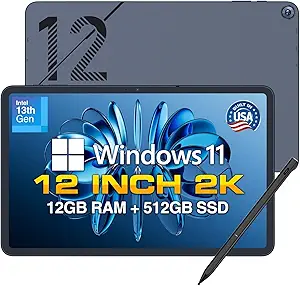
Fusion5 Helios 12 Windows 11 Tablet PC – 12″ 2K Display, 12GB DDR5 RAM, 512GB SSD, Stylus Pen, Active Cooling Fan
The Fusion5 Helios 12 offers a compelling blend of high-resolution display, powerful RAM, and active cooling, making it suitable for creative professionals or power users. Its 12-inch 2K (2000×1200) touchscreen provides more screen real estate and clarity than standard HD tablets, similar to the Fusion5 10.1” Rugged Tablet, but with added finesse. The built-in stylus and active cooling fan support detailed digital work and sustained heavy workloads, respectively. Its all-metal construction and fast 36W PD charging underscore its premium feel. The main tradeoff involves weight and price: heavier than basic tablets and priced at a premium for demanding users. It’s an ideal choice for those who need performance and precision in a portable form.
Pros:- Vivid 12″ 2K display with extra clarity and screen space
- Active cooling fan for sustained performance during heavy workloads
- Stylus pen included for precise input
- Premium metal casing with fast 36W USB-C charging
Cons:- Heavier weight may reduce portability
- Higher price point compared to basic tablets
Best for: Creative professionals and power users who require a high-quality display and active cooling for intensive tasks.
Not ideal for: Casual users or budget-conscious buyers who do not need the 2K resolution or active cooling features.
- Display:12″ 2K (2000×1200)
- RAM:12GB DDR5
- Storage:512GB SSD
- Processor:Intel 13th Gen Quad-Core
- Cooling System:Active Fan
- Build Material:Premium Metal
Bottom line: This tablet suits demanding creatives who need a high-resolution display and active cooling in a portable form, accepting the higher cost and weight.
10.1″ Windows 11 Tablet with 6GB RAM, 128GB Storage, Intel Processor, 6000 mAh Battery
This compact Windows 11 tablet provides a practical option for casual users or those who need a portable device for simple tasks. Its 10.1-inch screen and 6GB RAM are adequate for web browsing, media streaming, and light productivity. Compared with the Microsoft Surface Pro 7+, it offers a more affordable entry point but falls short on processing power and storage capacity, which could hamper multitasking or file storage for more demanding users. The 6000mAh battery supports up to 12 hours of use, adding to its portability. The plastic shell reduces costs but also feels less durable than metal alternatives. Overall, this tablet fits users with basic needs who prioritize affordability and portability over high-end performance.
Pros:- Long-lasting 6000mAh battery with up to 12 hours of use
- Lightweight, portable design
- Affordable price point for basic Windows functionality
- Multiple connectivity options (Wi-Fi, Bluetooth, USB 3.0)
Cons:- Plastic shell feels less premium and might be less durable
- 6GB RAM may struggle with multitasking on Windows 11
Best for: Students or casual users needing a lightweight, affordable Windows tablet for web, media, and light tasks.
Not ideal for: Power users or professionals requiring extensive multitasking, large storage, or durable build quality.
- Screen Size:10.1 inches
- RAM:6GB
- Storage:128GB, expandable via microSD
- Processor:Intel
- Battery:6000 mAh
- Ports:USB 3.0, Micro HDMI
Bottom line: This tablet is best for casual users or students seeking an affordable, portable Windows device for basic tasks, accepting limited performance and durability.
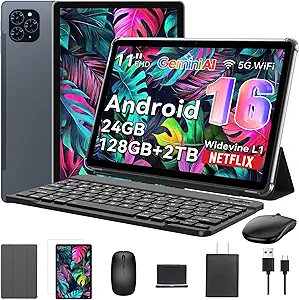
TABWEE T90 11-Inch Android 16 Tablet with Gemini AI 3.5, 24GB RAM, 8000mAh Battery
The TABWEE T90 stands out for its immense 24GB RAM, which makes it ideal for users who need to run multiple demanding apps or multitask seamlessly. Compared to the Lenovo Idea Tab Pro, which offers a high-quality display and AI tools, the T90 focuses on raw power, though its Unisoc T615 processor can struggle under intensive workloads. Its 8000mAh battery supports extended use, making it suitable for work or entertainment on the go. The included keyboard, mouse, and stylus turn this tablet into a portable workstation, especially valuable for freelancers or students managing heavy workloads. The main tradeoff is that its processor may underperform for tasks like high-end gaming or video editing. This pick suits users who prioritize performance and accessories in a single device, accepting some processing limitations.
Pros:- Exceptional 24GB RAM for smooth multitasking
- Large 8000mAh battery supports all-day use
- Includes keyboard, mouse, and stylus for productivity
Cons:- Unisoc T615 processor may lag during intensive tasks
- 24GB RAM is more than necessary for basic use
Best for: Power users who need robust multitasking and productivity tools in an Android tablet
Not ideal for: Casual users or those seeking lightweight devices for simple tasks, as the high RAM may be overkill
- OS:Android 16
- Display Size:11 inches
- Resolution:1920 x 1200 FHD
- RAM:24GB (8GB built-in + 16GB virtual)
- Storage:128GB ROM (expandable to 2TB)
- Battery Capacity:8000mAh
Bottom line: This tablet is best for users who need serious multitasking capability and versatile accessories in an Android device.
Lenovo Idea Tab Pro Student Tablet with Google Gemini, 12.7″ 3K LCD Display, 8GB RAM, 128GB Storage, MediaTek Dimensity 8300 Processor (Includes Pen and Folio Case)
The Lenovo Idea Tab Pro combines a stunning 12.7” 3K LCD display with AI-enhanced study tools like Google Gemini, making it an excellent choice for students who value visual clarity and smart features. Its MediaTek Dimensity 8300 processor offers smooth performance for typical study and media tasks, although it may fall short for demanding multitasking compared to the TABWEE T90’s high RAM. The included Pen Plus and folio case enhance note-taking and portability, while the 11-hour battery life supports long study sessions. The device’s limited storage options and lack of expandable storage could be restrictive for heavy media users. This tablet is best suited for students prioritizing high-quality visuals and AI-driven learning tools over raw power or extensive storage.
Pros:- Vivid 3K display for detailed visuals
- Includes productivity accessories (pen and case)
- AI-enhanced tools like Google Gemini for studying
Cons:- Limited storage and no expandable options
- Processor may lag during intense multitasking
Best for: Students who want a high-resolution display with integrated AI study features
Not ideal for: Heavy multitaskers or power users needing more RAM or storage flexibility
- Display Size:12.7 inches
- Resolution:3K LCD
- RAM:8GB
- Storage:128GB
- Processor:MediaTek Dimensity 8300
- Battery Life:11 hours
Bottom line: Ideal for students seeking a high-quality display with smart study features, but less suited for heavy multitasking or storage-heavy use cases.
Lenovo Idea Tab 11″ College Tablet with 2.5K IPS Display and MediaTek Dimensity 6300
The Lenovo Idea Tab 11″ offers a balanced mix of performance and affordability, with a 2.5K IPS display that provides clear visuals for studying and media. Its MediaTek Dimensity 6300 processor handles everyday tasks smoothly, though it might not match the speed of higher-end models like the Idea Tab Pro. The AI-powered Circle to Search feature enhances quick translations and searches, adding practical value for students. The device’s 12-hour battery life and included Pen and Folio Case support productivity, but the 90Hz refresh rate could feel sluggish compared to more modern 120Hz screens. This tablet is best for budget-conscious students who want decent performance without sacrificing display quality or stylus support.
Pros:- Long 12-hour battery life for all-day usage
- High-quality 2.5K display with low blue light
- Includes stylus and folio case for productivity
Cons:- 90Hz refresh rate may feel slower than 120Hz screens
- Limited app ecosystem for stylus features
Best for: Students seeking an affordable, all-around tablet for learning and entertainment
Not ideal for: Power users or gamers demanding high refresh rates and extensive multitasking performance
- Screen Size:11 inches
- Display Type:2.5K IPS Touchscreen
- Processor:MediaTek Dimensity 6300
- RAM:8GB
- Storage:256GB
- Battery Life:up to 12 hours
Bottom line: Perfect for students wanting a capable, budget-friendly tablet with good visuals and AI features, but less ideal for fast-paced gaming or heavy multitasking.
TABWEE T20 Android 16 Tablet with 24GB RAM, 256GB ROM (Expandable to 2TB), Octa-Core Processor and Gemini AI
The TABWEE T20 offers a compelling mix of high RAM, expandable storage, and versatile accessories, making it a top pick for those who want a tablet that can double as a laptop. Its MediaTek T606 Octa-Core processor and 24GB RAM ensure smooth multitasking, even with demanding apps, unlike the Lenovo Idea Tab Pro which relies more on its display quality. The detachable keyboard and stylus support productivity on the go, though the 10″ HD display might feel limited for media consumption compared to larger models. The 5000mAh battery provides about 6 hours of use, suitable for short work sessions or media. This device is best suited for users who need a compact, powerful device that can handle heavy multitasking and productivity tasks.
Pros:- High-performance T606 Octa-Core processor with Gemini AI
- 24GB RAM for seamless multitasking
- Expandable storage up to 2TB
Cons:- Limited 10″ display may feel small for media
- Battery life of around 6 hours might be insufficient for extended use
Best for: Power users and professionals needing a compact, high-performance 2-in-1 device
Not ideal for: Those prioritizing media consumption on a large display or needing longer battery life
- Processor:MediaTek T606 Octa-Core @ 2 GHz
- RAM:24GB (8GB physical + 16GB virtual)
- Storage:256GB ROM (expandable to 2TB)
- Display:10″ HD 1280×800
- Battery:5000mAh
- Included Accessories:Keyboard, stylus, mouse
Bottom line: Best for users who demand a powerful, flexible 2-in-1 tablet with extensive multitasking capabilities in a compact form.
Microsoft Surface Pro 2024 13″ Copilot+ PC
The Surface Pro 2024 elevates the 2-in-1 category with its premium build, 13″ touchscreen, and AI-enhanced Copilot+ features. Compared to the Lenovo Idea Tab Pro, it offers a more refined design, longer battery life, and a Windows environment that’s familiar for productivity. Its Snapdragon X Plus processor and 16GB RAM deliver solid performance for professional tasks, though some Copilot+ features depend on future software updates, which could limit immediate utility. The detachable keyboard (sold separately) provides flexibility for work or entertainment, but adds to the total cost. This device is best for business users or creatives who want a portable, premium Windows tablet with AI capabilities and long-lasting battery life.
Pros:- Premium build and 13″ high-resolution display
- AI-powered Copilot+ features for enhanced productivity
- Long battery life up to 14 hours
Cons:- Detachable keyboard sold separately increases total cost
- Some features rely on future software updates
Best for: Business professionals and creatives seeking a premium Windows 2-in-1 with AI features
Not ideal for: Budget-conscious buyers or casual users who don’t need Windows or premium build quality
- Processor:Snapdragon X Plus (10 Core)
- RAM:16GB
- Storage:512GB
- Display Size:13 inches
- Battery Life:Up to 14 hours
Bottom line: Ideal for professionals needing a sleek, powerful Windows 2-in-1 with AI assistance, willing to invest in premium features.

How We Picked
To select these products, we focused on a mix of performance, usability, build quality, and value. We prioritized devices with recent hardware, like Intel’s latest CPUs and ample RAM, which ensure smooth multitasking and future-proofing. Battery life and display quality were also key, especially for portable devices. Durability and warranty support factored in for rugged or premium models, while price was a consideration for the best value picks. Products were ranked based on how well they balance these factors to meet different user needs, from casual browsing to demanding creative work.Factors to Consider When Choosing Best Computers, Tablets & Components
When choosing the best computer, tablet, or component, considering your primary use case is essential. Different tasks demand different specs, and tradeoffs often involve weight, battery life, and cost. Understanding these factors helps avoid overspending on features you won’t use or missing out on critical performance for your needs.Performance & Hardware
Hardware specifications like CPU speed, RAM, and storage determine how well a device handles your daily tasks. For demanding workloads such as video editing or gaming, prioritize high-end CPUs and ample RAM. Casual users might find mid-range specs sufficient, saving money while maintaining smooth operation. Investing in recent-generation processors often extends the device’s relevance, but be mindful of increased power consumption and heat generation.
Display & Size
The screen size and resolution directly affect usability and portability. Larger displays (12 inches and up) are better for productivity and media consumption, but they tend to be heavier and less portable. 2K or 3K screens offer sharper images, ideal for creative work, but may reduce battery life. Consider where you’ll use the device most often to choose a size and resolution balance that fits your lifestyle.
Battery Life & Portability
Battery performance is crucial if you need mobility or work on the go. Devices with larger batteries or power-efficient components can last through a workday, but often at the cost of weight or size. Rugged or high-performance models may sacrifice battery longevity for durability or speed. Matching your usage patterns with battery capacity ensures you stay productive without frequent charging.
Build Quality & Support
Durability matters especially for rugged or premium devices. Devices with metal chassis or reinforced designs withstand daily wear, while warranty support adds peace of mind. For users who travel or work outdoors, rugged tablets with water and shock resistance are worth considering. Premium models often come with better support options, but at a higher price point.
Price & Value
Price ranges widely in this category, reflecting differences in hardware, build quality, and brand. Establish your budget upfront and compare features accordingly. Sometimes, spending a bit more on a device with better specs or warranty can save money long-term by avoiding early replacements or repairs. For budget-conscious buyers, focusing on core features without unnecessary extras can deliver the best value.
Frequently Asked Questions
Should I prioritize performance or portability when choosing a tablet?
This depends on your primary use. If you need a device mainly for light browsing, note-taking, or media consumption, portability should take precedence, favoring smaller, lighter tablets with good battery life. However, if your work involves multitasking or creative tasks, a larger, more powerful device might be worth the extra weight. Balancing performance and portability ensures you get a device that fits your lifestyle without compromise.
Is it worth investing in a rugged tablet for everyday use?
Rugged tablets are designed for durability and often come with features like water resistance and shockproofing, making them ideal for outdoor or industrial environments. For everyday use in a standard office or home setting, the added bulk and cost may not be justified. However, if your work involves frequent travel or exposure to harsh conditions, investing in ruggedness can prevent costly repairs or replacements down the line.
How much should I spend for a good balance of features and value?
The sweet spot varies by user, but generally, devices in the $400-$800 range offer a good mix of performance and affordability for most consumers. In this range, you can find modern processors, decent RAM, and quality displays without overpaying for premium features you might not need. For specialized tasks like gaming or professional creative work, consider stretching your budget to access higher-end specs.
Are 2-in-1 tablets worth it for students or remote workers?
2-in-1 tablets provide flexibility by functioning as both a tablet and a laptop, making them highly appealing for students and remote workers. They support stylus input and detachable keyboards, which enhance productivity and note-taking. The tradeoff is often increased weight and cost compared to traditional tablets, so assess whether the added versatility aligns with your daily tasks and mobility needs.
What should I consider when choosing a device with a high-resolution display?
High-resolution screens, such as 2K or 3K, offer sharper images and text, which is beneficial for creative work, reading, or media viewing. However, they typically consume more power, reducing battery life. They also tend to increase the device’s cost. If you prioritize portability and long battery life, a slightly lower resolution might better suit your needs, while still offering excellent clarity for most tasks.
Conclusion
For general users seeking a reliable, all-around device, the Microsoft Surface Pro 2024 offers the best balance of performance, versatility, and support. Budget-conscious buyers will find the Fusion5 Helios 12 provides excellent specs at a lower price point. Those needing the most power and premium features should consider the Microsoft Surface Pro 2024 or similar high-end options. Beginners or casual users benefit from straightforward, user-friendly devices like the Jeazans Android 16 Tablet. If durability is a priority, rugged options like the Fusion5 rugged tablet are best. Ultimately, the right choice depends on your specific needs—whether for productivity, entertainment, or demanding professional work.